
Access Maintenance Apps for Maximo & TRIRIGA
Service Requests
Work Orders
Corrective Tasks
Preventive Maintenance
Asset Management
Inspections, Rounds & Readings
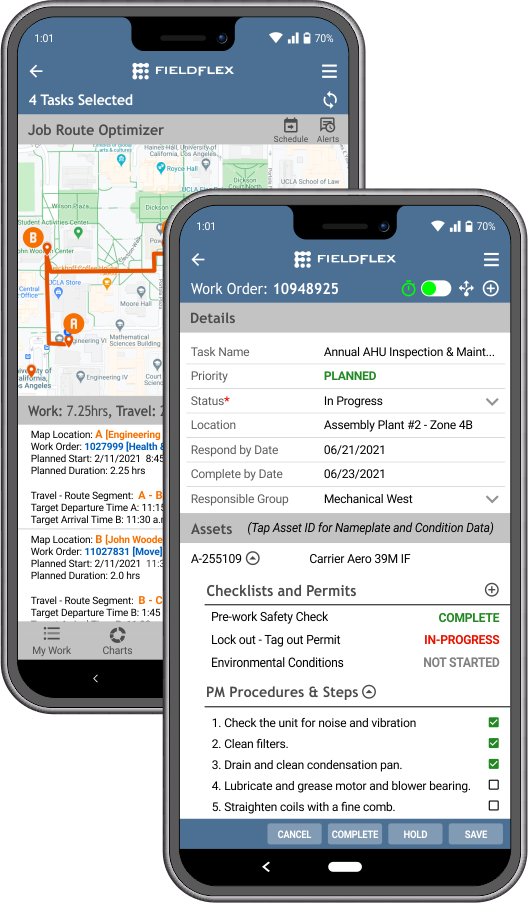
FieldFLEX offers a robust line-up of Maintenance apps for Maximo and TRIRIGA, and specifically designed for your asset and facilities maintenance teams. Our apps are focused on what field technicians need at their fingertips, bringing together all data and work processes from your IBM Maximo, TRIRIGA and other enterprise platforms into one mobile experience. Our mobile maintenance apps handle large volumes of data, ensuring your field teams can continue their work at all times – on or offline. Most importantly, FieldFLEX Maintenance apps for Maximo and TRIRIGA keep your field technicians focused on their tasks – not on their technology.
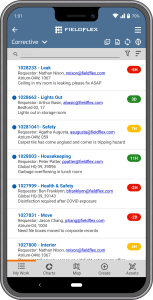
Work Orders for TRIRIGA and Maximo
Give your field techs all the data they need to work uninterrupted through their day. Field techs can receive and update work orders and tasks, track time, order parts & materials, take meter readings, document root cause and complete job-critical checklists at the point-of-work.
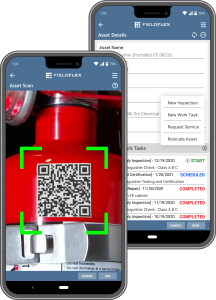
Asset Management for TRIRIGA and Maximo
Scan asset and equipment barcodes to access vital asset information and asset-related activities. A simple barcode scan can: attach an asset to a work order, retrieve asset lifecycle history, generate new service requests, move requests or work orders, add assets to inventory, or conduct inspections and meter readings.
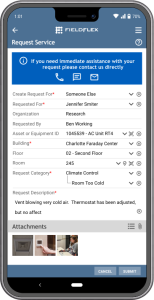
Service Requests for TRIRIGA and Maximo
Ensure all service and repair requests and work activities are logged so nothing falls through the cracks. A simple, intuitive mobile app guides users step-by-step to capture all information required to fulfill the request. And, this app can be used by field techs and staff alike.
| ------------------------ | Get Started Package | Deployment Package | Enterprise Package |
|---|---|---|---|
| ✓ = Included in the package ○ = Optional feature that can be included for an additional cost | Get Started Package Provides buy-in from upper management and successful adoption from key users | Deploy to a larger group of users and continue user adoption | Deploy company-wide and/or globally |
| Standard Features | |||
| Role-Based Functionality and User Interface (UI) | ✓ | ✓ | ✓ |
| Offline Capability with Data Sync | ✓ | ✓ | ✓ |
| Accommodate Large Amount of Transaction | ✓ | ✓ | ✓ |
| Secure Login Through Authentication | ✓ | ✓ | ✓ |
| App Features | |||
| Create Work Orders | ✓ | ✓ | ✓ |
| View & Update Work Orders | ✓ | ✓ | ✓ |
| Assign Work Orders | ✓ | ✓ | ✓ |
| Bar Code Scanning | ✓ | ✓ | ✓ |
| Time Tracking | ✓ | ✓ | ✓ |
| Attach Documents | ✓ | ✓ | ✓ |
| Attach Photos & Videos | ✓ | ✓ | ✓ |
| Add Completion Notes | ✓ | ✓ | ✓ |
| Push Notifications | ✓ | ✓ | ✓ |
| Bulk Updates | ✓ | ✓ | |
| Add Parts & Materials | ✓ | ✓ | |
| Include location | ✓ | ✓ | |
| View/Re-Open Completed Work Orders | ✓ | ✓ | |
| Self-Assign Work Orders | ✓ | ✓ | |
| Photo/Document Mark Up | ✓ | ✓ | |
| Schedule Tasks | ✓ | ✓ | |
| Work/Task Routing | ✓ | ✓ | |
| Capture Work Analysis' | ✓ | ✓ | |
| Asset Management | ○ | ✓ | |
| Manually Create Asset Record | ○ | ✓ | |
| Bar Code Scanning | ○ | ✓ | |
| Associate to a Work Order | ○ | ✓ | |
| View Service History | ○ | ✓ | |
| Revise/Update Details | ○ | ✓ | |
| Attach Associated Documents | ○ | ✓ | |
| Optional Services | |||
| Configuration with Non-Standard TRIRIGA or Maximo Configurations | ○ | ○ | ○ |
| Infrastructure Setup | ○ | ○ | ○ |
| InfoSec (Information Security) Settings - IT Vetting, Security Scans, etc. | ○ | ○ | ○ |
| Single Sign-On (SSO) | ○ | ○ | ○ |
| Mobile Device Management (MDM) Support | ○ | ○ | ○ |
| On-Premise Implementation | ○ | ○ | ○ |
| Third Party Document Management | ○ | ○ | ○ |
| IoT Integrations | ○ | ○ | ○ |
| Additional ERP Integrations | ○ | ○ | ○ |
Need More Information?
Our dedicated care and support team is always available to assist you.